Deploy an ADK agent to Agent Platform Runtime
Copy as MarkdownIn my previous post, we created an agent with ADK and ran it locally. The next step is to deploy it to Agent Platform runtime.
You can deploy to the runtime using a Python script that imports your agent, and configures the remote resource, and performs the deployment. This approach serializes your live object graph which is simple, but not suitable for production. We’ll cover production hardening later.
Create the following script in the root project folder (the one containing trading_agent from the previous example). There’s nothing to edit in it: the project ID is read from your environment (via Application Default Credentials), and the staging bucket name is derived from it (gs://${PROJECT_ID}-trading-agent), with the bucket created on first run if it doesn’t exist. Just point gcloud at the right project first:
gcloud config set project YOUR_PROJECT_ID
import os
import google.auth
import vertexai
from dotenv import load_dotenv
from trading_agent.agent import app

load_dotenv('trading_agent/.env')

# Project ID is read from your environment / Application Default Credentials.
_, PROJECT_ID = google.auth.default()
if not PROJECT_ID:
    raise ValueError("No project found. Set GOOGLE_CLOUD_PROJECT or run: gcloud config set project <id>")
LOCATION = "us-west1"

# Defaults to gs://$PROJECT_ID-trading-agent; override if needed.
STAGING_BUCKET = f"gs://{PROJECT_ID}-trading-agent"

vertexai.init(project=PROJECT_ID, location=LOCATION, staging_bucket=STAGING_BUCKET)

print(f"Deploying ADK Trading Agent to project {PROJECT_ID}...")
client = vertexai.Client(project=PROJECT_ID, location=LOCATION)
remote_agent = client.agent_engines.create(
    agent=app,
    config={
        "staging_bucket": STAGING_BUCKET,
        "display_name": "Trading Agent",
        "description": "An ADK agent that analyzes financial news and makes paper trades on Alpaca.",
        "requirements": "trading_agent/requirements.txt",
        "extra_packages": ["trading_agent/agent.py"],
        "env_vars": {
            "APCA_API_KEY_ID": os.getenv("APCA_API_KEY_ID", ""),
            "APCA_API_SECRET_KEY": os.getenv("APCA_API_SECRET_KEY", ""),
            "GOOGLE_GENAI_USE_VERTEXAI": "TRUE",
        },
    },
)

resource_name = remote_agent.api_resource.name
resource_id = resource_name.split("/")[-1]

print()
print("Deployment complete!")
print(f"View in the console: https://console.cloud.google.com/agent-platform/runtimes/locations/{LOCATION}/agent-engines/{resource_id}/playground?project={PROJECT_ID}")
print()
print("To trade, export the resource name and run trade.sh:")
print(f"  export RESOURCE_NAME={resource_name}")
print("  ./trade.sh")
This is a simple python script to call the deployment API with your desired configuration. It’s not actually part of your agent python code, which is why I recommend keeping it in the parent directory. I used Gemini CLI to generate it for me, with a prompt like “deploy my agent to Agent Platform”. The key to get the coding agent to work is to be in the right directory, and source the env so it has everything it needs.
One important thing to note is that when you want to call Gemini APIs from your project, set GOOGLE_GENAI_USE_VERTEXAI to TRUE, and do NOT pass in GOOGLE_API_KEY. The GOOGLE_API_KEY is long-lived bearer token designed for development use. In production, Google Cloud can use the agent’s identity (service account) to call Gemini, and the auth is handled automatically. For Alpaca, since this is just a paper trading account, I’m configuring the secrets a env vars. For a more robust setup, you would use secrets manager to avoid having the secrets in the configuration.
To deploy, from the project folder, when using venv, source our environment (if not already done):
source trading-env/bin/activate
and run the deploy python:
python deploy.py
On completion it prints the agent’s resource name and a direct link to its Playground in the console.
Note: this deployment path uses object serialization to produce the deployment artifact. Rather than copying your python files, the compiled python bytecode is serialized with cloudpickle, stored in the bucket you specify.
Interacting with the agent
With the agent deployed, we can interact with it in the Playground by creating a new session and chatting “trade”.
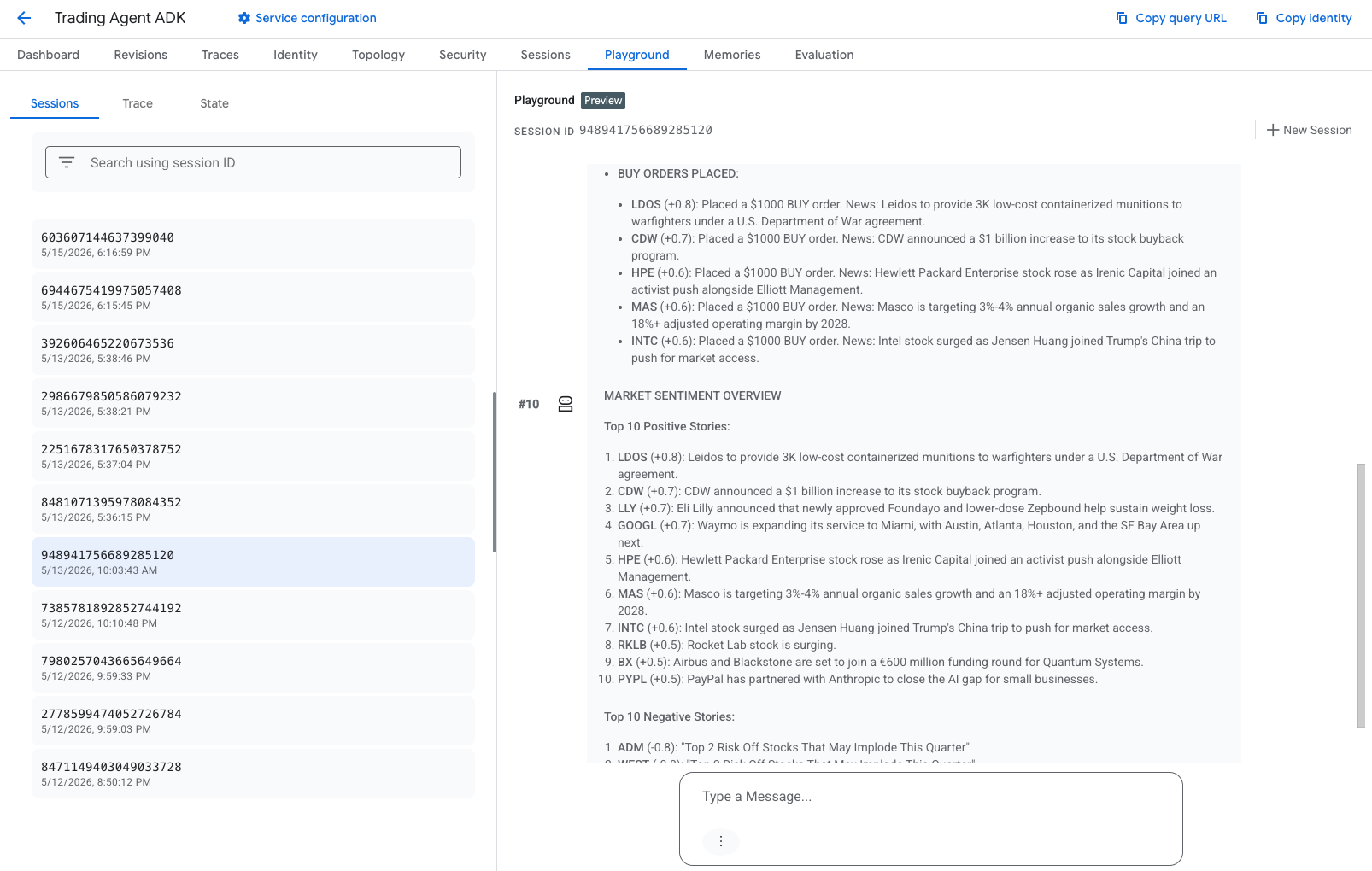
Command line sessions
To run a session via HTTP, you can use a script like this. Set the RESOURCE_NAME
variable based on the one printed during the deploy step, and run the trade script.
export RESOURCE_NAME=projects/.../locations/us-west1/reasoningEngines/...
./trade.sh
#!/bin/bash
set -e

# Set RESOURCE_NAME to the resource name printed by deploy.py
# (see https://console.cloud.google.com/agent-platform/runtimes).
if [[ -z "$RESOURCE_NAME" ]]; then
  echo "Error: RESOURCE_NAME is not set. Export it like:" >&2
  echo "  export RESOURCE_NAME=projects/555OOO555/locations/us-west1/reasoningEngines/5272175847371964416" >&2
  exit 1
fi

REGION=$(echo "$RESOURCE_NAME" | sed 's|.*/locations/\([^/]*\)/.*|\1|') # derive region from resource name
BASE_URL="https://${REGION}-aiplatform.googleapis.com/v1/${RESOURCE_NAME}"
USER_ID="test-user"
MESSAGE="${1:-Run the trading cycle.}"

TOKEN=$(gcloud auth print-access-token)

echo "Creating session..."
SESSION_RESPONSE=$(curl -s -X POST \
  -H "Authorization: Bearer ${TOKEN}" \
  -H "Content-Type: application/json" \
  "${BASE_URL}:query" \
  -d "{\"classMethod\":\"create_session\",\"input\":{\"user_id\":\"${USER_ID}\"}}")

SESSION_ID=$(echo "${SESSION_RESPONSE}" | jq -r '.output.id')
echo "Session created: ${SESSION_ID}"

echo "Sending query: ${MESSAGE}"
curl -s -X POST \
  -H "Authorization: Bearer ${TOKEN}" \
  -H "Content-Type: application/json" \
  "${BASE_URL}:streamQuery" \
  -d "{\"classMethod\":\"stream_query\",\"input\":{\"user_id\":\"${USER_ID}\",\"session_id\":\"${SESSION_ID}\",\"message\":\"${MESSAGE}\"}}" \
  | jq -rj 'select(.content.parts) | .content.parts[] | select(.text) | .text'

echo
Right now each session starts from scratch — open a new one and ask what it traded yesterday, and it’ll have no idea. Next up: Agent memories with ADK, so the agent can recall its past trading sessions.